> ## Documentation Index
> Fetch the complete documentation index at: https://kosli-mbevc1-patch-1.mintlify.site/llms.txt
> Use this file to discover all available pages before exploring further.
# Tracing a production incident to its git commit
> Learn how to use Kosli to trace a production 500 error in cyber-dojo back to the specific git commit that caused it — without any access to the production environment.
By the end of this tutorial, you will have traced a production incident from a 500 error all the way back to the git commit that caused it, using only Kosli CLI queries against the public cyber-dojo organization.
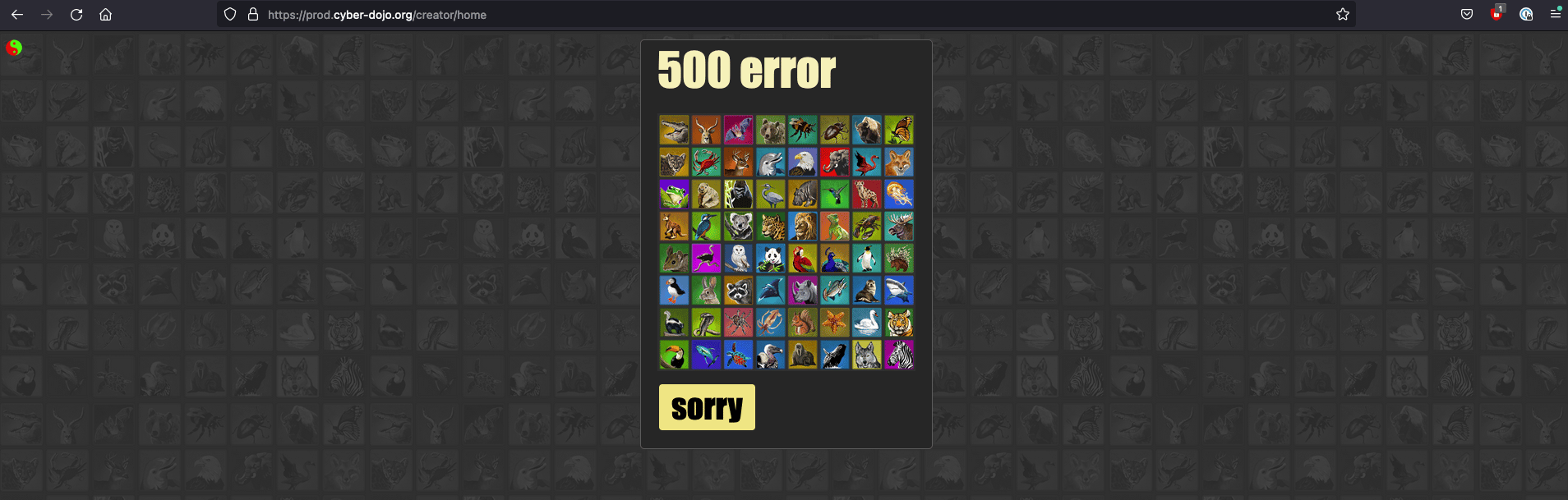 [https://cyber-dojo.org](https://cyber-dojo.org) is showing a 500 error. It was working an hour ago. What changed?
## Prerequisites
* [Install Kosli CLI](/getting_started/install).
* [Get a Kosli API token](/getting_started/authenticating_to_kosli).
## Setup
The `cyber-dojo` Kosli organization is public, so any authenticated user can read its data:
```shell theme={"theme":"dracula","languages":{"custom":["/languages/rego.json"]}}
export KOSLI_ORG=cyber-dojo
export KOSLI_API_TOKEN=
```
## Start with the environment
[https://cyber-dojo.org](https://cyber-dojo.org) runs in an AWS environment that reports to Kosli as `aws-prod`. Get a log of its recent changes:
```shell theme={"theme":"dracula","languages":{"custom":["/languages/rego.json"]}}
kosli log env aws-prod
```
The environment has accumulated many snapshots since this incident occurred. To focus on the relevant ones, scope the log to snapshots 176 and 177:
```shell theme={"theme":"dracula","languages":{"custom":["/languages/rego.json"]}}
kosli log env aws-prod --interval 176..177
```
You should see:
```plaintext theme={"theme":"dracula","languages":{"custom":["/languages/rego.json"]}}
SNAPSHOT EVENT FLOW
#177 Artifact: 274425519734.dkr.ecr.eu-central-1.amazonaws.com/creator:31dee35 creator-archived-at-1707630496
Fingerprint: 5d1c926530213dadd5c9fcbf59c8822da56e32a04b0f9c774d7cdde3cf6ba66d
Description: 1 instance stopped running (from 1 to 0)
Reported at: Tue, 06 Sep 2022 16:53:28 CEST
#176 Artifact: 274425519734.dkr.ecr.eu-central-1.amazonaws.com/creator:b7a5908 creator-archived-at-1707630496
Fingerprint: 860ad172ace5aee03e6a1e3492a88b3315ecac2a899d4f159f43ca7314290d5a
Description: 1 instance started running (from 0 to 1)
Reported at: Tue, 06 Sep 2022 16:52:28 CEST
```
When this incident happened the flow was simply named `creator`. The flow has since been archived, and archiving a flow currently renames it by appending `-archived-at-`. The historical evidence is unchanged; only the displayed name is longer.
These two snapshots are part of the same blue-green deployment: `creator:b7a5908` started in snapshot #176, and `creator:31dee35` stopped in snapshot #177. The new artifact arrived just before the 500 error — that is the one to investigate.
## Dig into the artifact
Get the full history of `creator:b7a5908` with `kosli search`, using the fingerprint prefix from snapshot #176:
```shell theme={"theme":"dracula","languages":{"custom":["/languages/rego.json"]}}
kosli search 860ad17
```
You should see:
```plaintext theme={"theme":"dracula","languages":{"custom":["/languages/rego.json"]}}
Search result resolved to artifact with fingerprint 860ad172ace5aee03e6a1e3492a88b3315ecac2a899d4f159f43ca7314290d5a
Name: cyberdojo/creator:b7a5908
Fingerprint: 860ad172ace5aee03e6a1e3492a88b3315ecac2a899d4f159f43ca7314290d5a
Has provenance: true
Flow: creator-archived-at-1707630496
Git commit: b7a590836cf140e17da3f01eadd5eca17d9efc65
Commit URL: https://github.com/cyber-dojo/creator/commit/b7a590836cf140e17da3f01eadd5eca17d9efc65
Build URL: https://github.com/cyber-dojo/creator/actions/runs/3001102984
Artifact URL: https://app.kosli.com/cyber-dojo/flows/creator-archived-at-1707630496/artifacts/860ad172ace5aee03e6a1e3492a88b3315ecac2a899d4f159f43ca7314290d5a
Compliance state: COMPLIANT
Running in: [ ]
Exited from: [ aws-beta, aws-prod ]
History:
Artifact created Tue, 06 Sep 2022 16:48:07 CEST
Started running in aws-beta#196 environment Tue, 06 Sep 2022 16:51:42 CEST
Started running in aws-prod#176 environment Tue, 06 Sep 2022 16:52:28 CEST
No longer running in aws-beta#199 environment Tue, 06 Sep 2022 21:28:42 CEST
No longer running in aws-prod#179 environment Tue, 06 Sep 2022 21:30:28 CEST
```
The artifact started running in `aws-prod` at 16:52 — right when the incident began. The output includes a direct link to the git commit. (You can also see the artifact exiting both environments later that evening, once the incident was fixed by a newer commit.)
## Follow to the commit
Open the [commit URL](https://github.com/cyber-dojo/creator/commit/b7a590836cf140e17da3f01eadd5eca17d9efc65) from the output:
[https://cyber-dojo.org](https://cyber-dojo.org) is showing a 500 error. It was working an hour ago. What changed?
## Prerequisites
* [Install Kosli CLI](/getting_started/install).
* [Get a Kosli API token](/getting_started/authenticating_to_kosli).
## Setup
The `cyber-dojo` Kosli organization is public, so any authenticated user can read its data:
```shell theme={"theme":"dracula","languages":{"custom":["/languages/rego.json"]}}
export KOSLI_ORG=cyber-dojo
export KOSLI_API_TOKEN=
```
## Start with the environment
[https://cyber-dojo.org](https://cyber-dojo.org) runs in an AWS environment that reports to Kosli as `aws-prod`. Get a log of its recent changes:
```shell theme={"theme":"dracula","languages":{"custom":["/languages/rego.json"]}}
kosli log env aws-prod
```
The environment has accumulated many snapshots since this incident occurred. To focus on the relevant ones, scope the log to snapshots 176 and 177:
```shell theme={"theme":"dracula","languages":{"custom":["/languages/rego.json"]}}
kosli log env aws-prod --interval 176..177
```
You should see:
```plaintext theme={"theme":"dracula","languages":{"custom":["/languages/rego.json"]}}
SNAPSHOT EVENT FLOW
#177 Artifact: 274425519734.dkr.ecr.eu-central-1.amazonaws.com/creator:31dee35 creator-archived-at-1707630496
Fingerprint: 5d1c926530213dadd5c9fcbf59c8822da56e32a04b0f9c774d7cdde3cf6ba66d
Description: 1 instance stopped running (from 1 to 0)
Reported at: Tue, 06 Sep 2022 16:53:28 CEST
#176 Artifact: 274425519734.dkr.ecr.eu-central-1.amazonaws.com/creator:b7a5908 creator-archived-at-1707630496
Fingerprint: 860ad172ace5aee03e6a1e3492a88b3315ecac2a899d4f159f43ca7314290d5a
Description: 1 instance started running (from 0 to 1)
Reported at: Tue, 06 Sep 2022 16:52:28 CEST
```
When this incident happened the flow was simply named `creator`. The flow has since been archived, and archiving a flow currently renames it by appending `-archived-at-`. The historical evidence is unchanged; only the displayed name is longer.
These two snapshots are part of the same blue-green deployment: `creator:b7a5908` started in snapshot #176, and `creator:31dee35` stopped in snapshot #177. The new artifact arrived just before the 500 error — that is the one to investigate.
## Dig into the artifact
Get the full history of `creator:b7a5908` with `kosli search`, using the fingerprint prefix from snapshot #176:
```shell theme={"theme":"dracula","languages":{"custom":["/languages/rego.json"]}}
kosli search 860ad17
```
You should see:
```plaintext theme={"theme":"dracula","languages":{"custom":["/languages/rego.json"]}}
Search result resolved to artifact with fingerprint 860ad172ace5aee03e6a1e3492a88b3315ecac2a899d4f159f43ca7314290d5a
Name: cyberdojo/creator:b7a5908
Fingerprint: 860ad172ace5aee03e6a1e3492a88b3315ecac2a899d4f159f43ca7314290d5a
Has provenance: true
Flow: creator-archived-at-1707630496
Git commit: b7a590836cf140e17da3f01eadd5eca17d9efc65
Commit URL: https://github.com/cyber-dojo/creator/commit/b7a590836cf140e17da3f01eadd5eca17d9efc65
Build URL: https://github.com/cyber-dojo/creator/actions/runs/3001102984
Artifact URL: https://app.kosli.com/cyber-dojo/flows/creator-archived-at-1707630496/artifacts/860ad172ace5aee03e6a1e3492a88b3315ecac2a899d4f159f43ca7314290d5a
Compliance state: COMPLIANT
Running in: [ ]
Exited from: [ aws-beta, aws-prod ]
History:
Artifact created Tue, 06 Sep 2022 16:48:07 CEST
Started running in aws-beta#196 environment Tue, 06 Sep 2022 16:51:42 CEST
Started running in aws-prod#176 environment Tue, 06 Sep 2022 16:52:28 CEST
No longer running in aws-beta#199 environment Tue, 06 Sep 2022 21:28:42 CEST
No longer running in aws-prod#179 environment Tue, 06 Sep 2022 21:30:28 CEST
```
The artifact started running in `aws-prod` at 16:52 — right when the incident began. The output includes a direct link to the git commit. (You can also see the artifact exiting both environments later that evening, once the incident was fixed by a newer commit.)
## Follow to the commit
Open the [commit URL](https://github.com/cyber-dojo/creator/commit/b7a590836cf140e17da3f01eadd5eca17d9efc65) from the output:
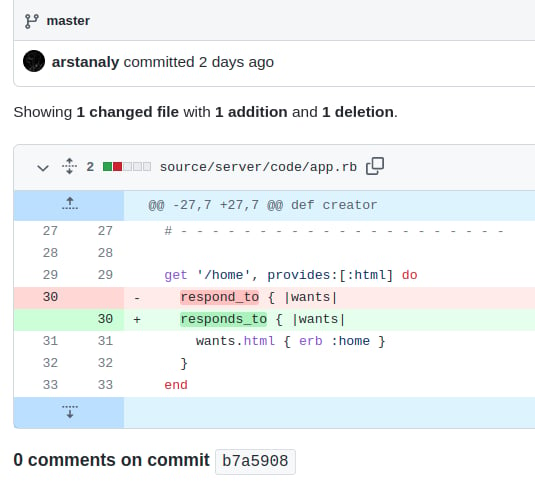 A simple typo in `app.rb` — an extra `s` inserted into the method name. The function is called `respond_to`, not `responds_to`. That one character caused the 500 error.
## What you've accomplished
You traced a production 500 error back to a specific git commit — without any direct access to `aws-prod`. By querying the environment log and artifact history in Kosli, you identified exactly which deployment introduced the incident and which code change caused it.
From here you can:
* Learn more about environment and artifact queries in the [Querying Kosli](/tutorials/querying_kosli) tutorial
* Learn how to follow any commit from CI into production with the [From commit to production](/tutorials/following_a_git_commit_to_runtime_environments) tutorial
A simple typo in `app.rb` — an extra `s` inserted into the method name. The function is called `respond_to`, not `responds_to`. That one character caused the 500 error.
## What you've accomplished
You traced a production 500 error back to a specific git commit — without any direct access to `aws-prod`. By querying the environment log and artifact history in Kosli, you identified exactly which deployment introduced the incident and which code change caused it.
From here you can:
* Learn more about environment and artifact queries in the [Querying Kosli](/tutorials/querying_kosli) tutorial
* Learn how to follow any commit from CI into production with the [From commit to production](/tutorials/following_a_git_commit_to_runtime_environments) tutorial